Tacet
EN

The same page, with the same facts, in five languages. The app speaks all five.

Get Tacet

tacet · Latin, “is silent”. In a score, the mark that tells a voice: be silent now.

What’s said in confidence stays in confidence.

07Become a testerClosed test · Google Play
Get TacetGoogle Play · closed test Become a tester

iPhone · coming soonno date yet

For now Android only, for accepted testers · Become a tester

Sealed messages, calls and documents, for anyone who keeps other people’s secrets. Encrypted on your phone before they leave it.

The server can’t read what you say, but it knows who talks to whom, and when. We tell you that in the very first line.

Android 8.0 and up · aged 18 and over · No phone number · Pioneers: 3 months free at launch

Saturday, 22:10 · MunichTacet Guest

He doesn’t have the app. He doesn’t need it.

Arben, in Munich, has a hearing in Tirana on Monday and a question he won’t type into an ordinary messaging app. He doesn’t have Tacet, and tonight he won’t install anything. His lawyer creates a Guest invitation: 15 minutes to join, a 30-minute conversation. She sends the link by email and reads him the 8-digit PIN over the phone, so that no single channel is enough. Arben opens it in Chrome and types the PIN. The lawyer gets the notification “A guest is requesting access”, and Arben gets in only when she lets him. They compare the safety code by voice, and they talk. When the conversation closes, no history is left.

  • You set the times: 5, 15 or 30 minutes to join; a 30 or 60-minute conversation.
  • Only with your approval. 5 wrong PINs revoke the invitation. Up to 3 invitations at once, also by QR.
  • Nothing to install: your guest joins from Safari on iPhone or Chrome on Android.

ProofAn 8-digit PIN created on your phone. On your phone, the conversation lives only in memory, up to 500 messages or 4 MB.

The limitText only — documents go with Letter in hand — and you both need to be online. The guest’s name is whatever they declare. reCAPTCHA and the relay see the guest’s IP address; minimal session metadata is kept for about 24 hours.

Try it: a Guest invitationDEMO · simulation · nothing is sent

Your phone

Time to join

Length

48291736

The link goes by email. Give the PIN through another channel.

A guest is requesting access

Good evening. Can I bring the contract on Monday at 09:00?

Yes. Bring the original, not the copy.

Conversation closed. No history is left.

Entry declined.

Your guest’s browser

Waiting for the link…

PIN (example)

···· ····

Waiting for your approval…

Good evening. Can I bring the contract on Monday at 09:00?

Yes. Bring the original, not the copy.

Conversation closed. No history is left.

Entry declined.

The invitation was revoked after 5 wrong PINs.

Pick the times and create the invitation.

The example needs JavaScript; the text above describes it in full.

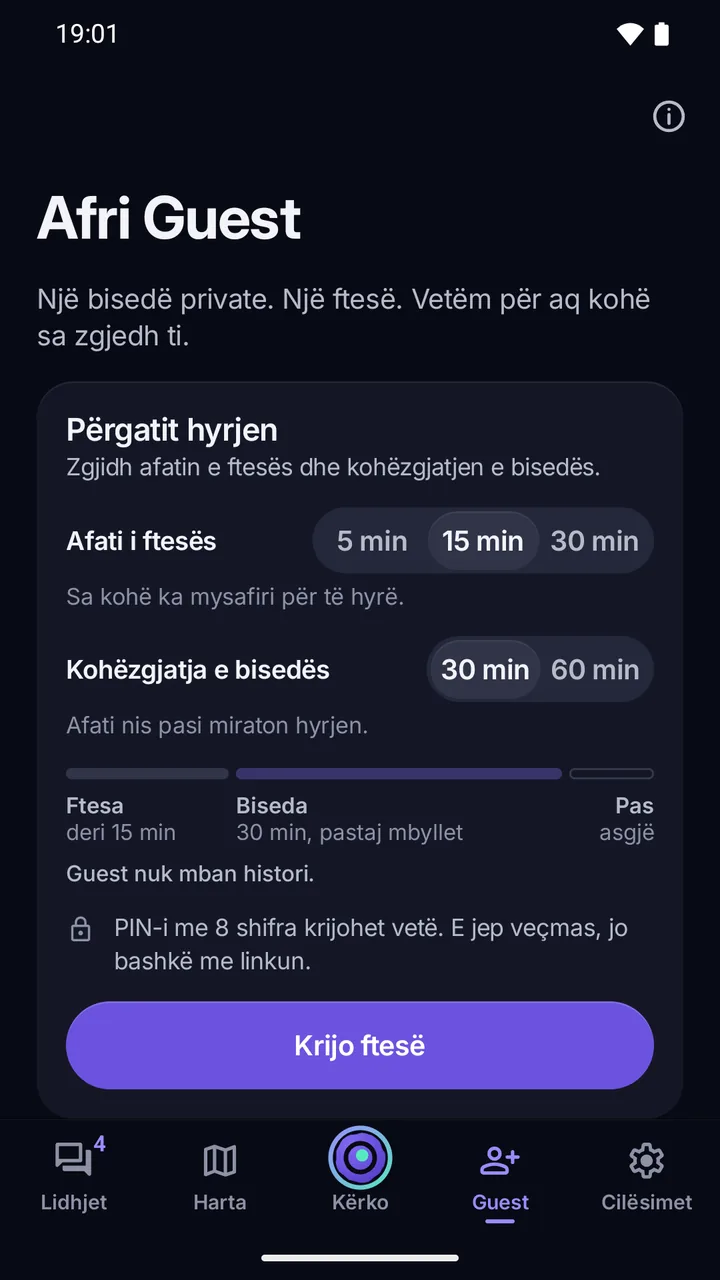
How it looks in the app
A real Guest screen: choosing the invitation time limit (5, 15, 30 min) and the conversation length (30, 60 min), the note about the 8-digit PIN and the “Create invitation” button.
A real screen, cropped at the top, where it still shows the app’s old name

Wednesday, 11:00 · MilanLetter in hand

Show the contract. Don’t hand it over.

Blerina, in Milan, is buying a flat in Durrës. The notary has to show her the draft contract, with the seller’s IBAN and addresses inside, but he doesn’t want the draft passed around in emails. He opens Letter in hand, picks the PDF and blacks out the IBAN with a finger: the covered parts are burned into the image itself and never leave his phone. He sends her the link and gives her the 8-digit code separately. Blerina opens it in Safari. The page shows only while the notary holds the wax seal on his phone, with her name and the date on every page. When he lifts his finger, the page closes on her screen. When it’s over, the letter won’t open again.

  • An 8-digit code, one opening. After 5 mistakes, or once opened, the link won’t open again.
  • Reading seal, if you turn it on: you see how long each page stayed on the recipient’s screen, as their page reports it, and the reader knows from the start.
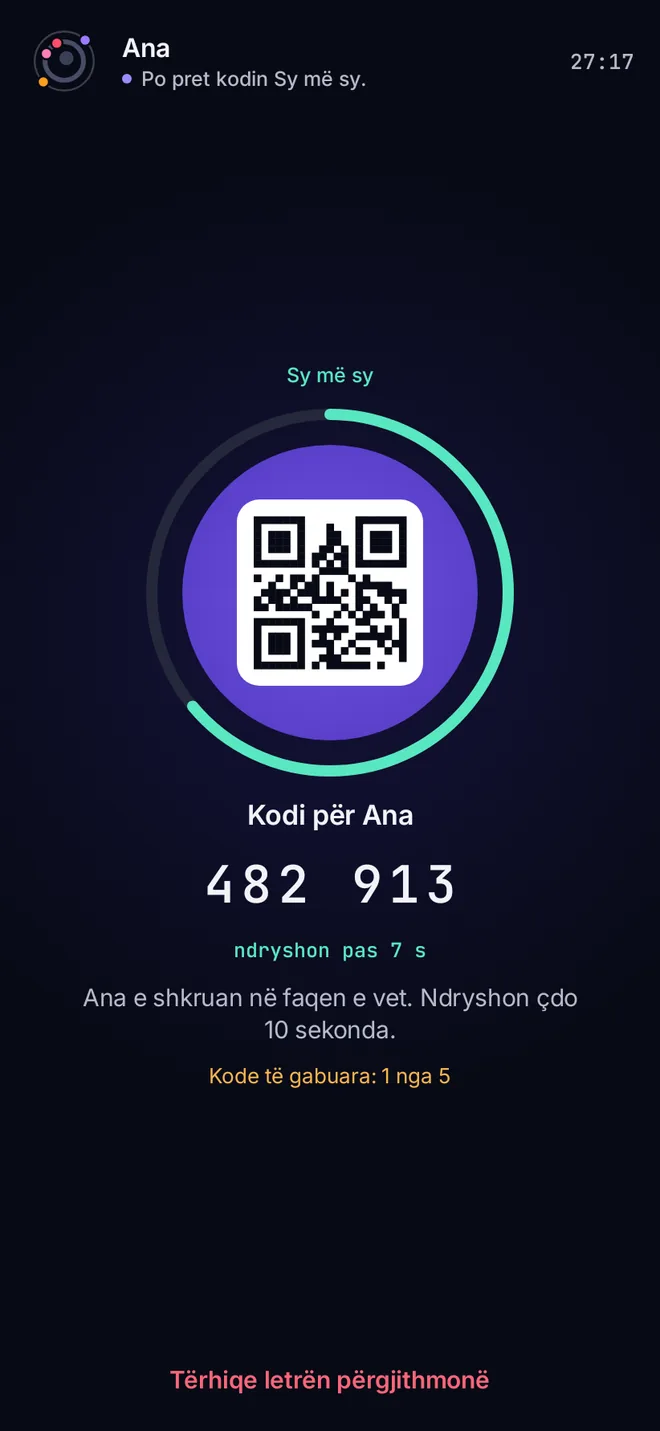
  • Face to face: the letter opens only when the reader types the code shown on your phone right now. The code proves only that someone read your screen at that moment.
  • Uploaded nowhere. Pages leave your phone only while you hold them open, encrypted all the way to the reader’s browser; the relay server neither reads nor stores them, but it does see how much data goes through and when.

ProofPDF, JPG, PNG or HEIC, up to 30 pages and 32 MB. In “Face to face” the code changes every 10 seconds.

The limitThe recipient’s browser cannot block screenshots: the watermark with their name discourages copying but does not stop it. A modified browser or extension could keep the pages it receives, watermark and black-outs included. “Face to face” only proves that someone read the code at that moment.

Try it: hold the sealDEMO · simulation · nothing is sent

In the app, you hold the seal on your phone and the page appears for the recipient, in their browser. Here you do both.

Press and hold the seal.Lift your finger and the page is covered.

Reading seal · Ana is reading · 0:00

The example needs JavaScript; the text above describes it in full.

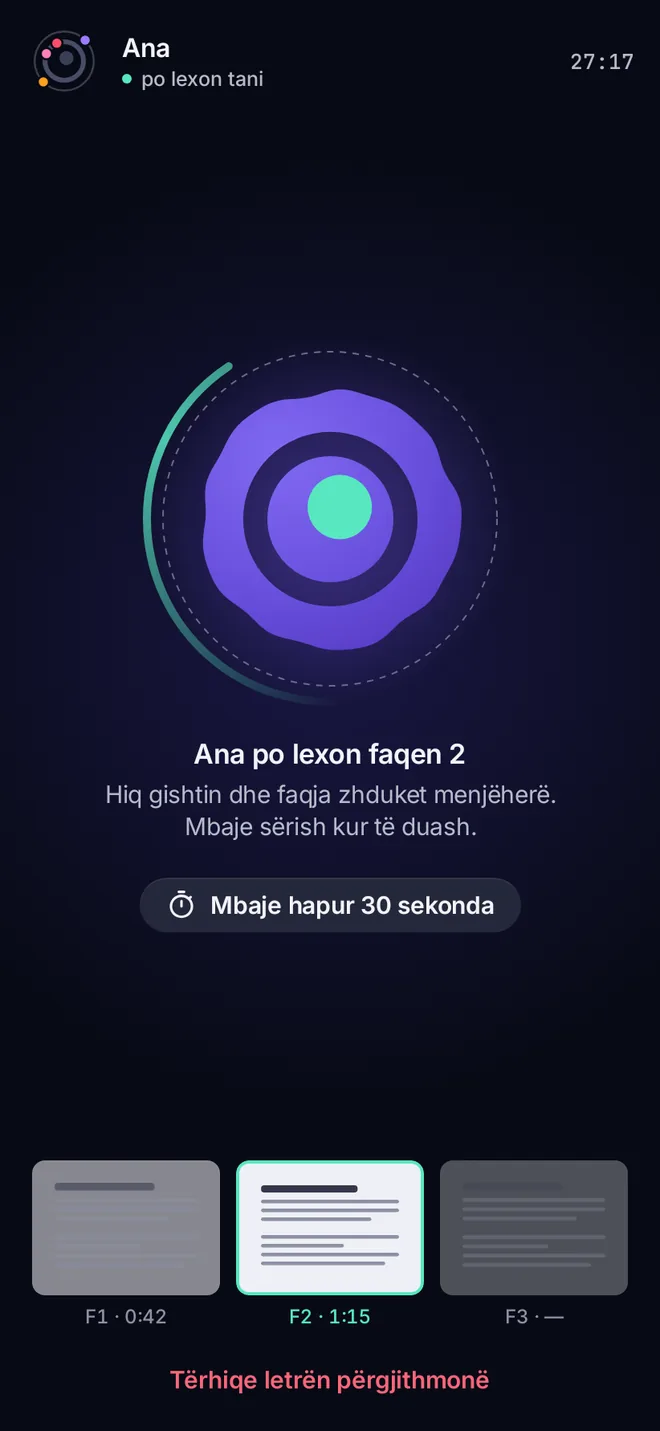
How it looks in the app
A real screen on the sender’s side: the large wax seal with the hold ring, “Ana is reading page 2”, and the reading times for each page.
A real screen of Face to face mode: a QR code inside a violet disc, the code 482 913 and the count of wrong codes.
Two real screens from the app · holding the seal, and Face to face

Friday, 01:50 · TiranaSecurity Center

The phone stayed in the taxi. The conversations didn’t.

Ana gets out of a taxi and, two streets later, realises: her phone is still on the back seat, with her clients’ conversations inside. On a friend’s laptop, in a private window, she opens tacet.chat/security, types her @username and Recovery Code, and taps “Lock device”. As soon as the phone receives the command, Tacet on it freezes: it no longer opens with the PIN or the fingerprint, only from the Center. In the morning the driver brings the phone back, and Ana unlocks it from the same page. Had it not come back, she also had the remote wipe code: the account is deleted on the server at once, and the phone is wiped as soon as it connects to the internet.

  • Two separate codes: the Recovery Code locks and unlocks; only the remote wipe code erases everything.
  • “Wipe everything” takes two taps, so nothing is erased by accident. It cannot be undone: messages, keys and the account.
  • Create the codes today, in Settings › Security. You need them before you need them.

ProofLocking revokes every session of the account at once. After several wrong codes, the Center locks for a while.

The limitThe command reaches the phone only when it has internet: until then, Tacet on it knows nothing. A remote wipe clears the phone when it reconnects; the account is deleted at once. The codes must be created before you need them.

Try it: the Center, in miniatureDEMO · simulation · nothing is sent

tacet.chat/security

These fields are read-only. Don’t type your own codes here: the real Center is at tacet.chat/security.

The account was deleted on the server at once.

Chats

Frozen · unlocks only from the Security Center

The command is waiting for the internet…

Wiped. Nothing of Tacet is left on this phone.

On someone else’s computer, open it in a private window and close it afterwards. Open the real Center →

The example needs JavaScript; the text above describes it in full.

How it looks in the app

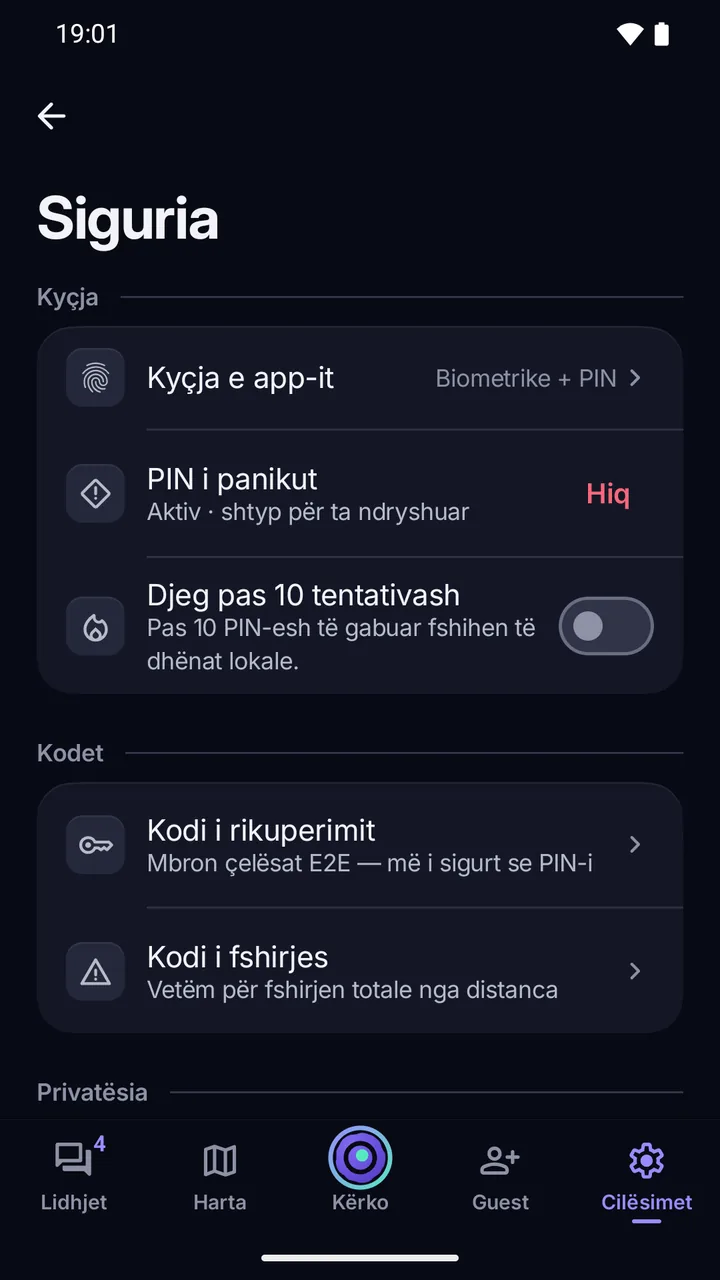
A real screen of Security: App lock (Biometrics + PIN), Panic PIN active, Wipe after 10 attempts, the Recovery Code and the Wipe Code.
A real screen from the app · demo data

Monday, 09:15 · waiting roomSensitive messages and covered media

The result stays covered, even face up on the table.

Drita’s phone lies on the waiting-room table, screen up. Her doctor sends her test result as a sensitive message. All that shows is a covered bubble. Drita taps it, confirms with her fingerprint or PIN, reads it, and with another tap, or as soon as the screen goes off, the bubble is covered again. The other way round, Drita sends the doctor a photo: on the doctor’s side, it stays veiled until she opens it with fingerprint or PIN, and “Cover now” hides it at once. Inside Tacet, screenshots and screen recording are blocked.

  • No GPS: before sending, the location and other embedded data are removed from photos and videos.
  • Gallery by permission: anyone who wants to save your media asks you first.
  • Photos go out at up to 1600 px, or up to 4096 px with “Photos in HD”. Files up to 25 MB. Media that didn’t go out waits up to 7 days, with “Try again”.
  • Ready when you tap: while you are in the chat, new photos and voice messages download encrypted, so they open without waiting for a download, even offline. In “Auto-download photos” choose “Always”, “Wi-Fi only” or “Never”.

ProofOpens on the first tap, after the fingerprint or PIN, only while the app is in the foreground. It is covered again when you tap it, leave the chat, turn the screen off or a screen recording starts.

The limitAny screen can be photographed with another device. With automatic download, the server sees when your phone downloads a media file, even before you open it.

Try it: the covered bubbleDEMO · simulation · nothing is sent

EDr Elira

Good morning. Your result is ready.

No fingerprint here: the button stands in for biometrics. In the app, it is covered again with a tap, or as soon as you leave the chat.

The example needs JavaScript; the text above describes it in full.

How it looks in the app

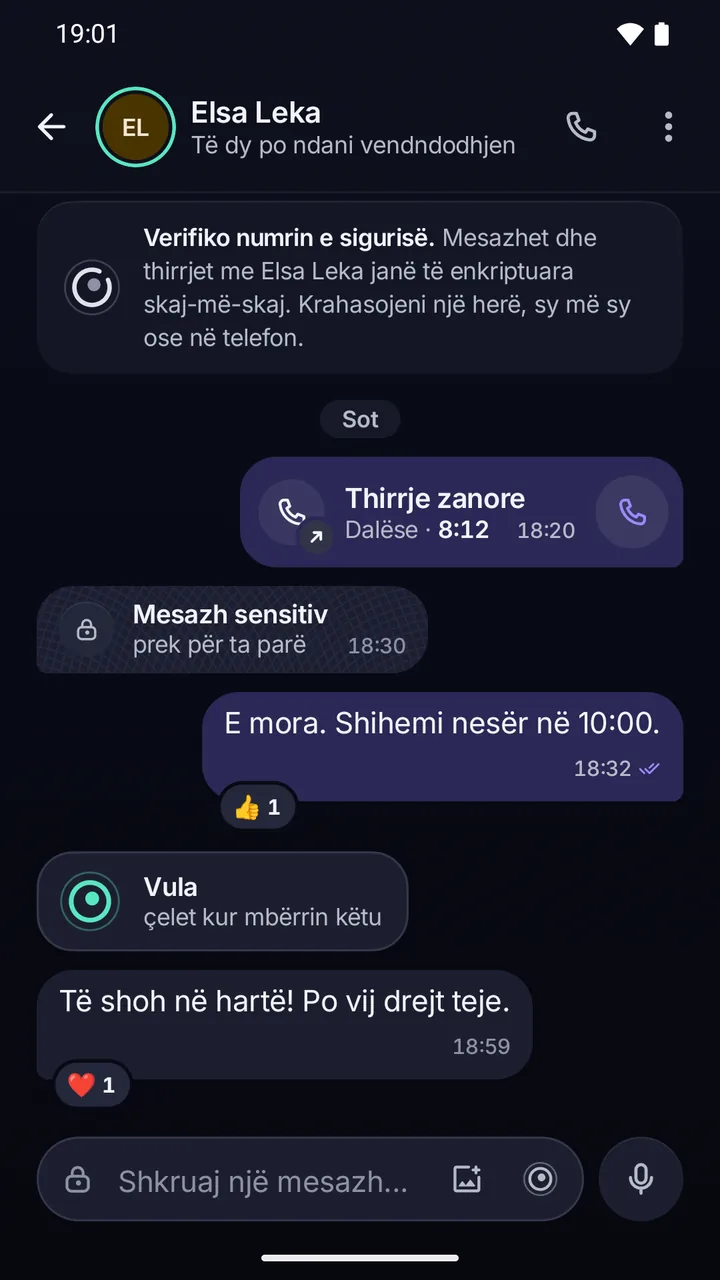
A real screen of a conversation: the prompt to verify the safety number, a voice call, a covered sensitive message, a Seal and reactions.
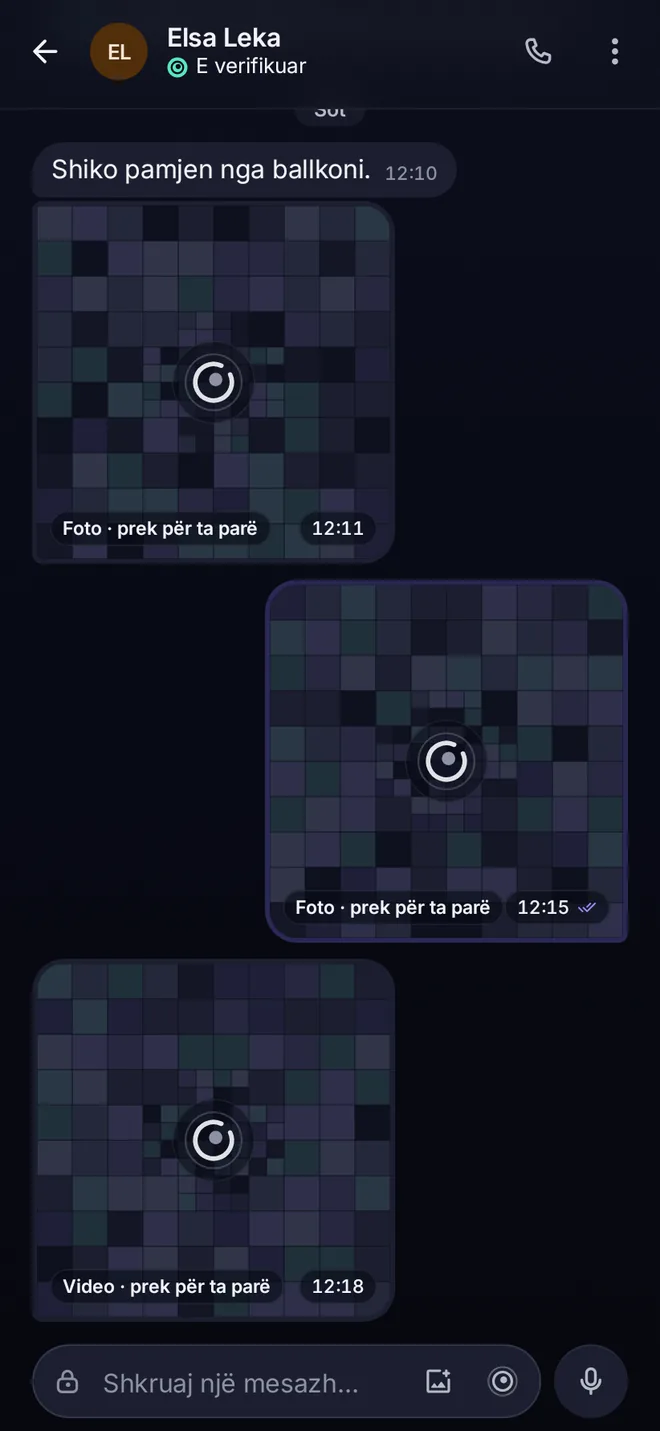
A real screen: two photos and a video under a mosaic cover, each with “tap to view”, in a chat with a verified contact.
Two real screens from the app · demo data

Thursday, 08:40 · outside the courtVula

Open it when you get there. Or when the time comes.

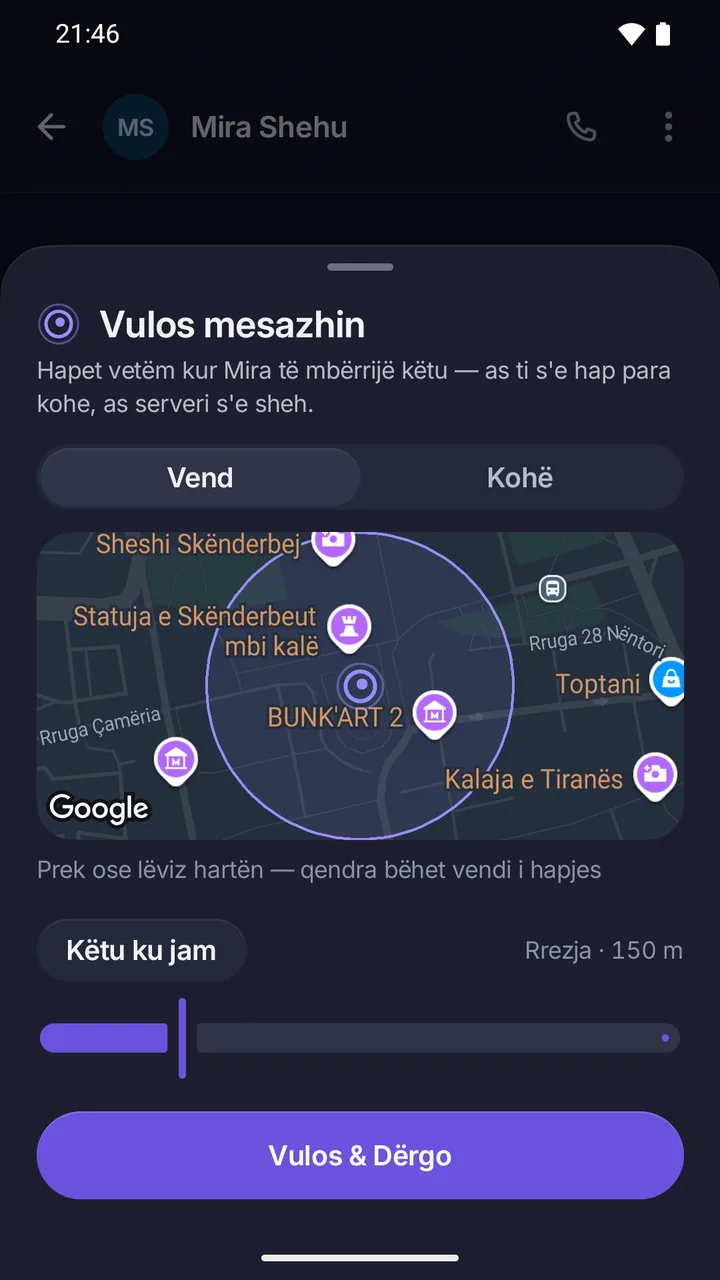
Last night the lawyer left his client a message sealed at the courthouse door, with a 150-metre radius: “Room 4. Don’t speak to the other party before the hearing. I’m inside at 9:00.” At home it wouldn’t open. As soon as the client opens the chat inside that radius, the seal breaks, and below it the proof appears: opened at the place. Vula has a gentler side too: an anniversary wish sealed the evening before, which opens by itself at midnight and notifies, even with the app closed.

  • A place or a time: a radius you choose, from 50 to 500 metres; or at midnight, in 1 hour, in 8 hours, or at a time you pick within the next 24 hours.
  • Inside: text, a photo or a voice note. The place and the content travel encrypted.
  • Proof of opening: once open, the seal shows how it opened, at the place or when the time came.

ProofThe app’s default radius is 150 m; a slider changes it from 50 to 500 m.

The limitThe Seal is a rule enforced by the recipient’s app, not a mathematical safe. In the Google Play version, the place seal doesn’t open by itself in a pocket: it opens when the recipient opens the chat at that place.

Try it: the seal on the mapDEMO · simulation · nothing is sent

Drag the recipient’s dot, or use the arrow keys.

The example needs JavaScript; the text above describes it in full.

How it looks in the app

A real screen: the “Seal the message” sheet in Place mode, with a map of Tirana, an opening radius of 150 m and the “Seal & Send” button.
A real screen from the app · demo data

02When things go wrong

When someone forces you, when you’re afraid, when someone lies to you.

Three protections for the moments nobody wants. Each with its own limit, because no app protects you from everything.

Panic PIN

Someone stands over your shoulder and says: “Open it.” You type your second PIN. The app stops location sharing, erases Tacet’s keys and data on that phone, even offline, and signs you out. All they get is the sign-in screen. Your account stays.

Try it: two PINsDEMO

Your PIN (example): 4829Panic PIN (example): 7316

Chats

In the app: location stops, Tacet’s keys and data on this phone are erased, and the app signs you out. The account stays.

The example needs JavaScript; the text above describes it in full.

ProofThe panic PIN has 4 to 8 digits. Easily guessed PINs are refused, and the wait after mistakes grows up to 24 hours. “Wipe Tacet after 10 wrong PINs” erases the app’s data on the phone, if you turn it on.

The limitIt doesn’t open a fake app: it signs you out, and copies held by others remain. If the phone gets internet within a few seconds, the recovery key on the server is erased too: old conversations won’t come back, not even with the Recovery Code. After “Wipe Tacet after 10 wrong PINs”, the Recovery Code still brings back your keys.
SOS

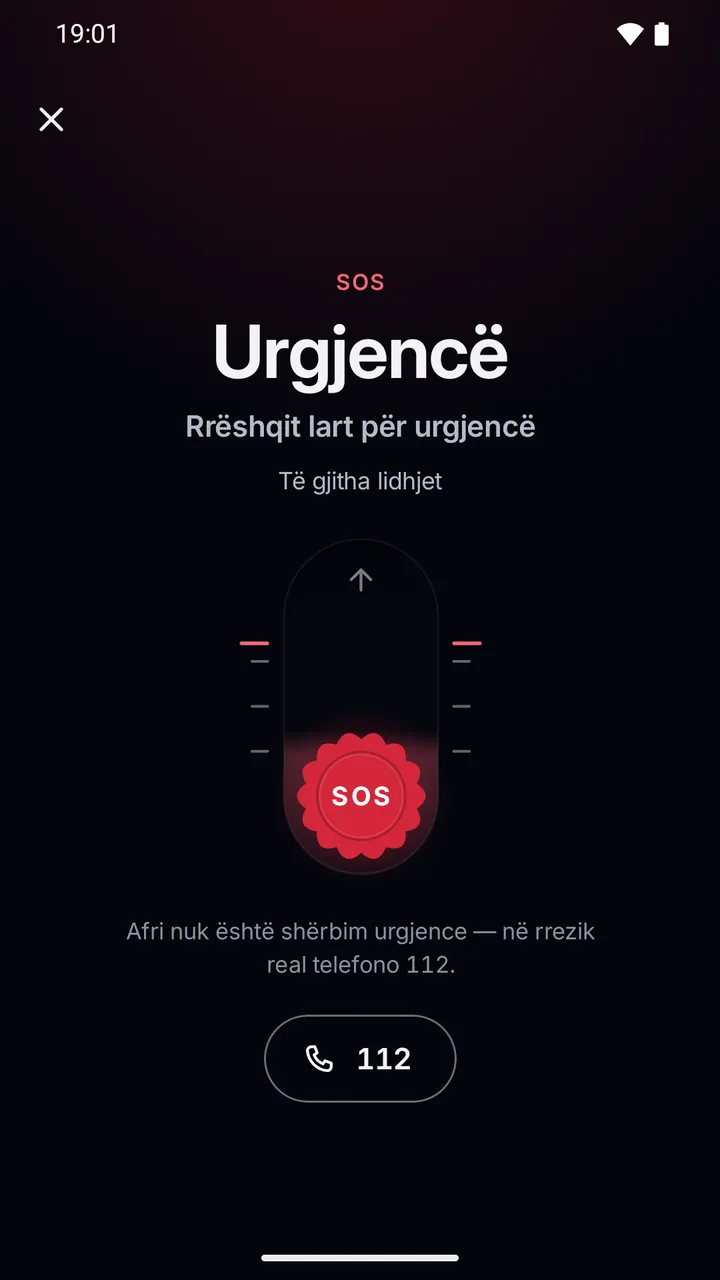
Sunday, 23:30, the walk home. Ana hears footsteps behind her and has no time to type. She taps SOS and slides up. Her brother and the friend she chose are alerted at once, with her name, and see her encrypted position, refreshed every 2 seconds. At her front door she taps “I’m safe”.

Tacet is not an emergency service — in real danger, call 112.SOS needs the internet, doesn’t call 112 and doesn’t override “Do Not Disturb”. If it wasn’t sent, or it’s unknown whether it was, the app tells you so and reminds you of the emergency number.

Try it: slide upDEMO
Slide up for an emergency

SOS · Alerted: 2 contacts · position every 2 seconds · 60 min left

The emergency is over. Your contacts know you’re safe.

With a keyboard: Enter or the up arrow.

The example needs JavaScript; the text above describes it in full.

ProofThe position refreshes every 2 seconds, for 60 minutes or until you tap “I’m safe”. If the SOS wasn’t sent, or it isn’t clear whether it was, the app tells you.

Tacet Guard

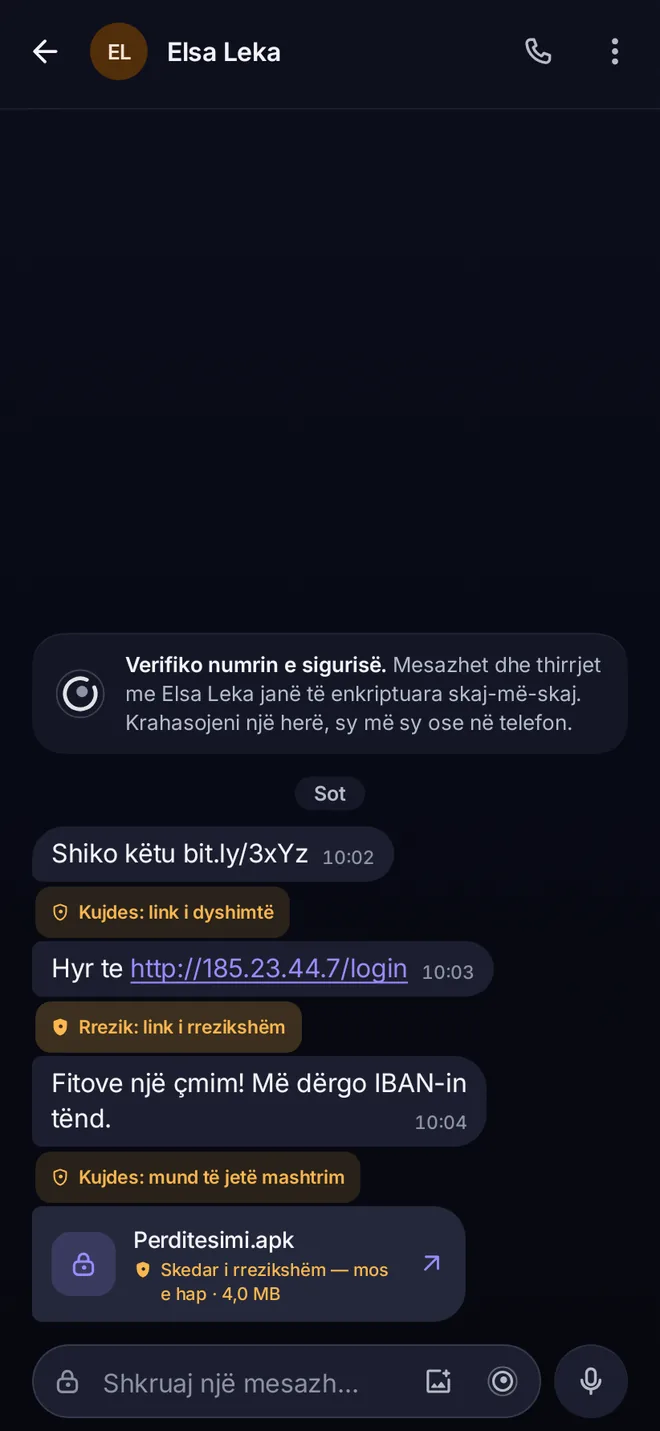
A message arrives from a new contact Mrs Vera accepted without really knowing them: “Your son has had an accident. Send me the code you got by SMS now, there’s no time.” Scam protection flags it above the message. When she types the code and taps Send, Tacet asks whether she is sure. She stops and calls her son. He is at work.

Try it: the suspicious messageDEMO

Your parcel is on hold. Pay the fee here: parcel-example.example

Caution: suspicious link

Urgent! I changed my IBAN. Pay today to the new account, don’t tell anyone.

Caution: pressure tactics

invoice.apk

Dangerous file — don’t open it

This demo’s rules are a few simple patterns; the app’s are different and broader.

The example needs JavaScript; the text above describes it in full.

ProofIt checks, on the phone, messages, links and QR codes in photos you open; it flags .apk and .exe files. You choose the sensitivity: low, medium or high.

The limitIt works with rules: it isn’t AI and it isn’t an antivirus, so it can miss something or raise a false alarm. Nothing leaves the phone for this check.

How it looks in the app
A real screen of SOS: “Emergency · Swipe up for emergency · All connections”, with the red slider and the SOS seal.
A real screen: Scam protection warnings in a chat — a suspicious link, a dangerous link, an IBAN request that may be a scam, and an .apk file marked dangerous.
Two real screens from the app · demo data

03Things you don’t see

Calls that don’t reveal your address. No phone number. No screenshots.

Calls, through our relay

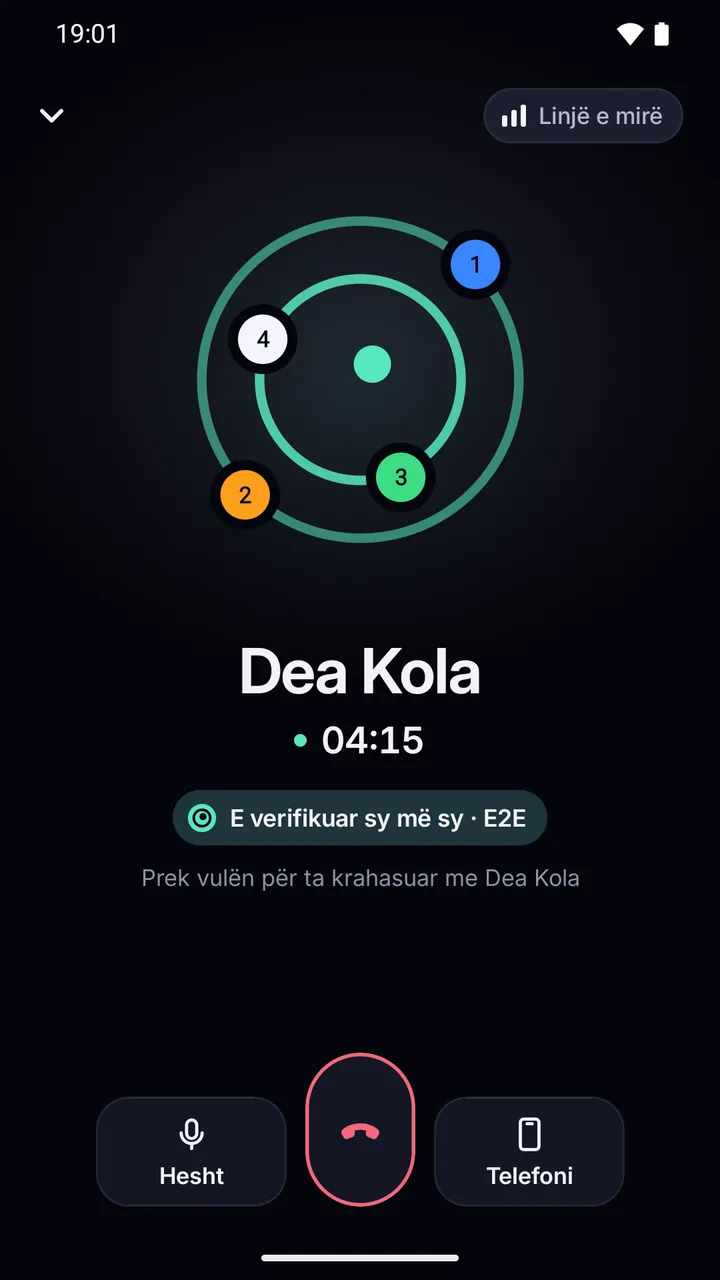
A doctor calls a patient from home without giving out her personal number. The call goes through Tacet’s relay in Germany, so the patient never learns her IP address, and the other way round. The phone rings only after the caller’s signature checks out, and both screens draw the same four planets.

  • The call’s safety code: both phones draw the same four planets — compare them by voice or on camera.
  • Your IP stays hidden from the other person: every call goes through our relay in Germany.
  • The camera doesn’t turn on before you answer; you can also answer without the camera.
  • The crown: the call ends with two taps, so you don’t hang up by accident.
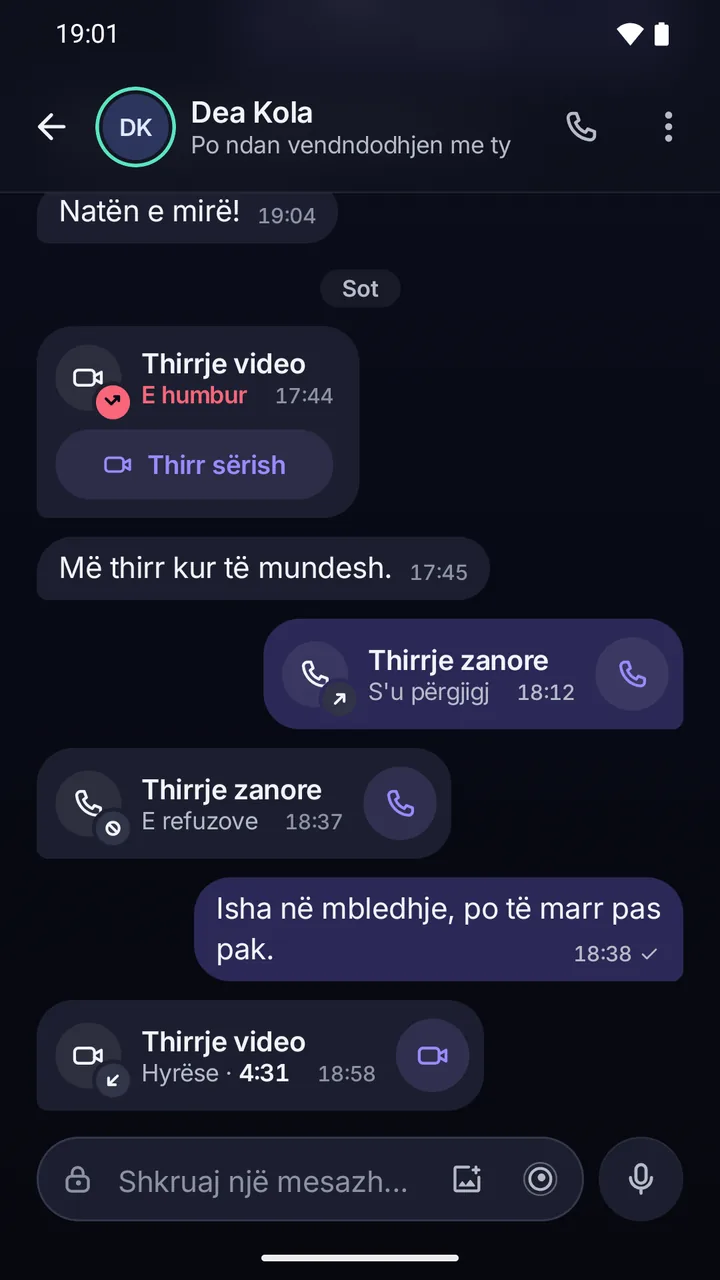
  • Line quality, reconnection, audio output, a warning when another app is using the microphone, and every call as a line in the chat.

The limitOne-to-one only: there are no group calls. The relay sees both IP addresses and the times, and keeps its logs for up to 24 hours. Calls use classical encryption (DTLS-SRTP), not post-quantum.

How it looks in the app

A real screen of an active voice call: the seal with four planets to compare, “Verified in person · E2E”, “Good connection” and the Mute, End and Phone buttons.
A real screen: calls as lines in a chat — a missed video call with “Call back”, outgoing and declined voice calls, an incoming video call.
Two real screens from the app · demo data

Once, face to face

Compare the 60 digits of the safety code with your contact, face to face or on the phone, and mark it as verified. If their key changes, sending stops until you verify again — on by default.

Safety code with Elsaexample
Not verified

An illustration, not a real code. The seal closes in mint only when it is marked “Verified”.

The limitThe comparison is done by eye; there is no QR scan for the safety code yet.

No phone number

You connect by QR or by a link that works once and expires after 7 days. With your @username, only someone who knows it in full can find you, and only if you turn it on. Tacet doesn’t read your phone’s contacts, and only connections you accepted can write to you.

The limitYour personal QR doesn’t expire. The server knows your @username and who talks to whom.

No screenshots

Screenshots and screen recording are blocked on every screen of the app. The lock with PIN, biometrics or both can’t be turned off, and the app locks as soon as you leave it.

The limitAny screen can be photographed with another device.

Location, only with consent

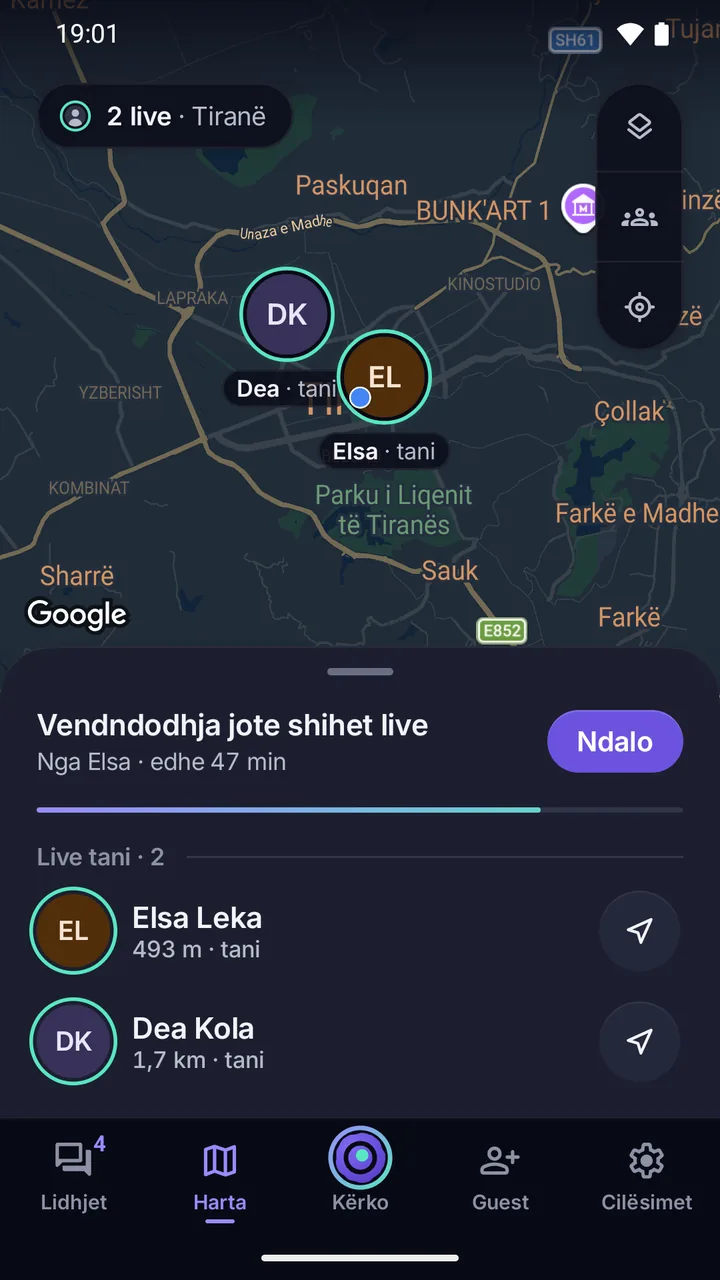
Share it live for 15 minutes, 1 hour or 24 hours, only with the connections you choose, and stop at any time. The position is encrypted separately for each person who sees it: the server doesn’t know where you are.

  • Who sees me: stop one person or everyone; “Stopped” appears only once the server confirms it.
  • Arrival notice: when you reach a place, the contact you chose automatically gets “I’ve arrived at …”.
  • Follow someone on the map, or navigate to them with one tap. My places are stored only on your phone.

The limitA maximum of 24 hours. The server sees that you are sharing, with whom and until when, but not the coordinates. The map is Google Maps: Google sees the area the phone displays.

How it looks in the app

A real screen of the Map over Tirana: two live contacts, the card “Your location is visible live · 47 min left” with a Stop button, and a list with distances.
A real screen from the app · demo data

04For your profession

What you need tomorrow morning.

Lawyers

A client abroad joins through Guest from the browser. The draft agreement is shown with Letter in hand, the IBAN blacked out and the client’s name on every page. Instructions for the hearing are sealed to 09:00. Calls with witnesses go through the relay.

The limitTacet helps you keep professional secrecy, but it doesn’t replace your obligations. It isn’t a case archive, and disappearing messages aren’t a record.

Doctors

Media you receive stays covered until you open it with fingerprint or PIN. Sensitive messages are covered again as soon as you tap them or leave the chat, and messages can disappear after 1 hour, 24 hours or 7 days. You talk to a patient without the app through Guest.

The limitTacet isn’t a medical records system and has not been certified for any health-data standard. Patient consent and data retention remain your responsibility.

Notaries

With Letter in hand, a deed of up to 30 pages is shown with IDs and addresses blacked out before they leave the phone. For the party who comes to the office there is “Face to face”. For suspicious IBAN requests there is Scam protection.

The limitThe watermark with the name discourages copying in the browser, but it doesn’t stop it. When the law requires you to keep deeds, Tacet isn’t where they are kept.

Clients and families

No phone number, and nothing to install for a guest. SOS for the people you choose, live location with a time limit, and the Security Center when a phone is lost. The app speaks Albanian, English, Italian, German and Turkish.

The limitTacet doesn’t make you anonymous, and SOS isn’t an emergency service: in real danger, call 112.

04bBusiness card · The living card

Your business card, with a conversation inside.

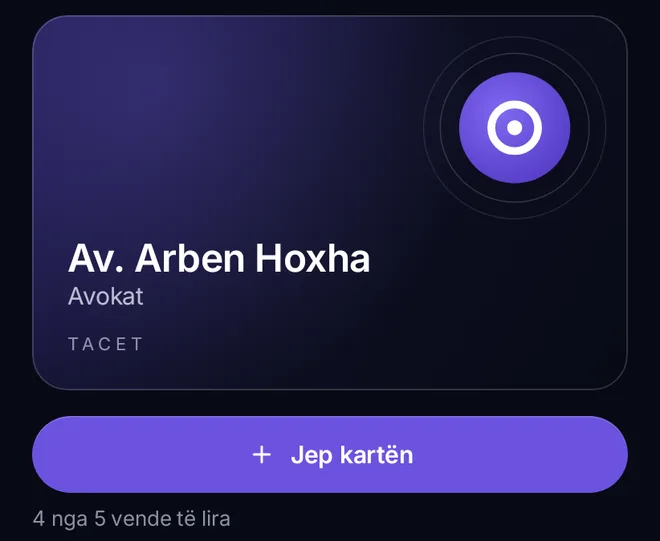
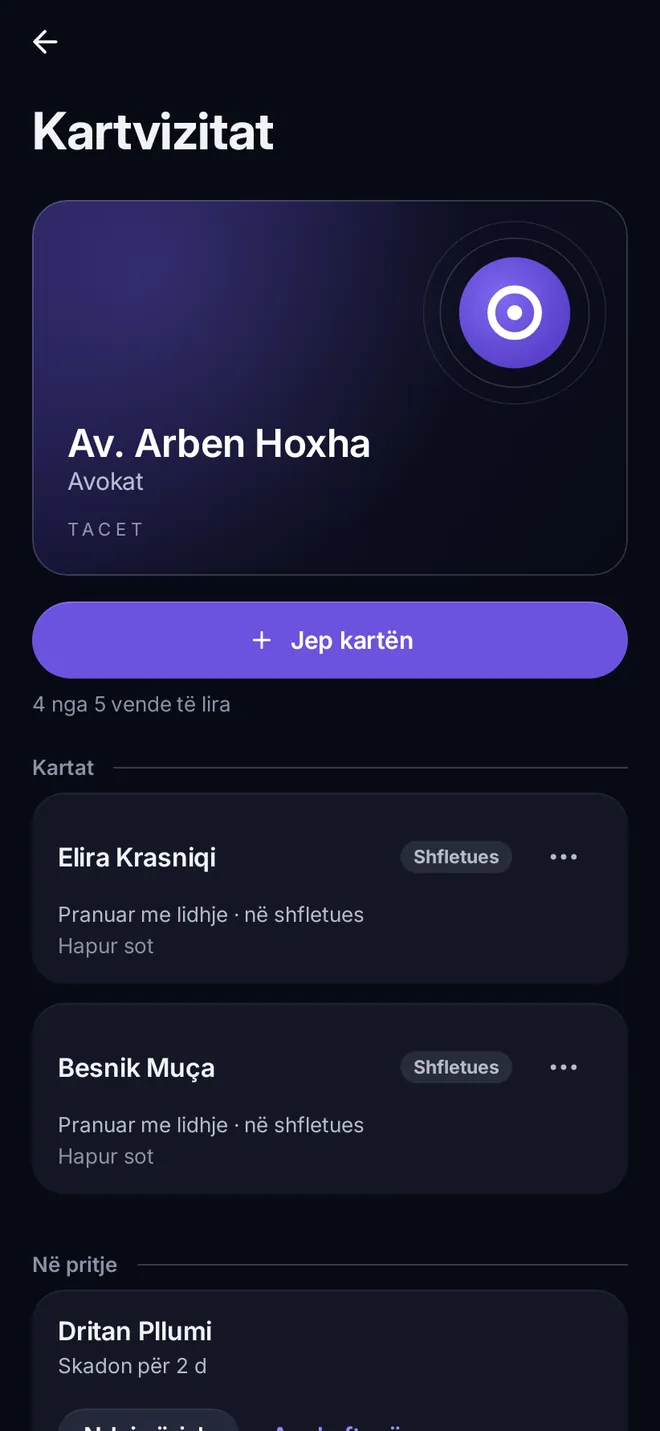
In the app, your card is an object: your name, your profession and the Tacet seal. You give it to a client as a link or a QR code. They open it in the browser, and the card becomes the place where you talk.

Real screenshot from the app: the card of Av. Arben Hoxha, lawyer, with the Tacet seal, and the “Give your card” button.
A real screen from the app · demo data
  1. 1Give

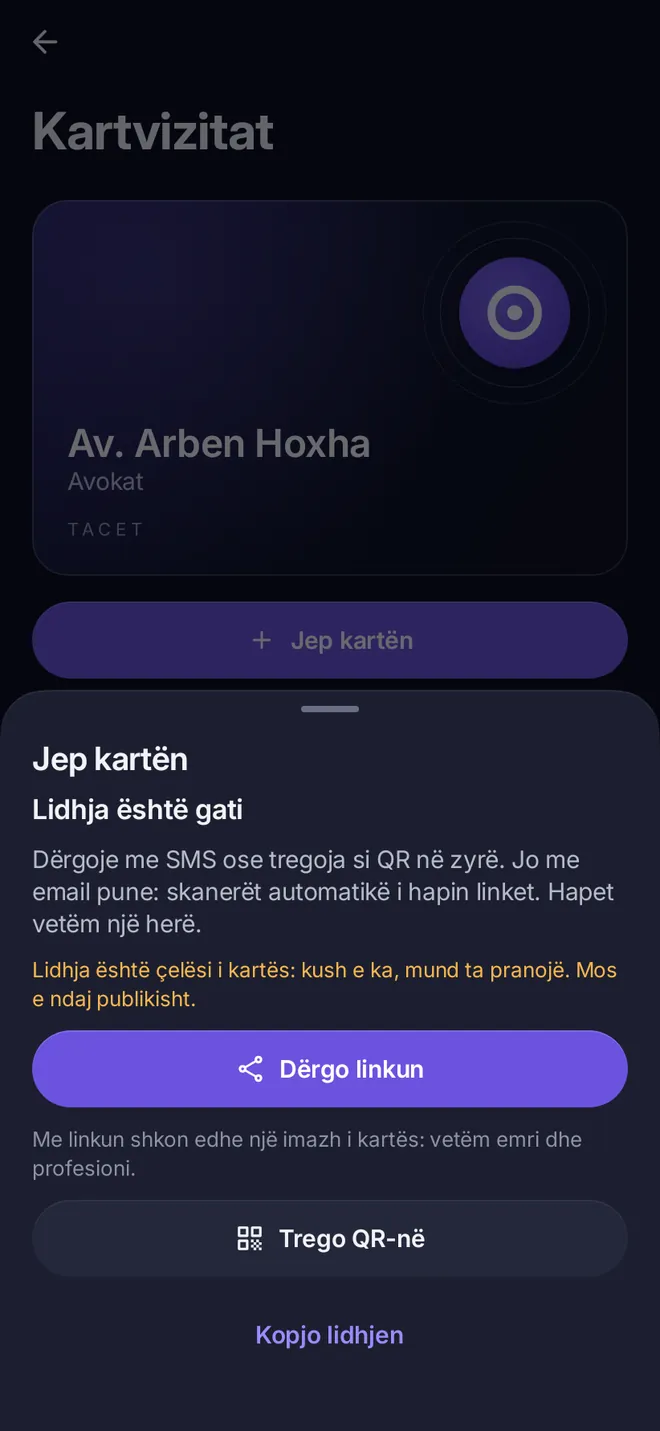
    Tap “Give your card”, then “Send the link”, “Show the QR code” or “Copy the link”. The link opens once. Its preview holds only the Tacet seal and an invitation to open it in the browser: the same for every card, with nothing secret in it.

  2. 2Open

    The client needs no app, account, email or password: the card lives in their browser. They can add it to the home screen and open it with one tap.

  3. 3The safety code, by voice

    When the client opens the card, you both see the same safety code, in the same order. Compare it by phone. When it matches, the card is marked “Checked by voice”.

  4. 4Talk

    Messages are encrypted end to end, in the browser and on your phone, before they leave. Photos or PDFs up to 20 MB are encrypted before upload: the server sees only the size and whether it is a “photo” or a “file”. The client does not see your @username, only the name you write.

  5. 5Close

    You or the client close it with “Close the card”; the client also has “Delete everything in this browser”. Messages and documents are deleted on the server; when you close it, the texts the client has saved stay in their browser until they delete them.

ProofWhat is stored in the client’s browser, what the server sees and how the card is deleted: privacy policy, section 16.

The limitToday the card is only for a few chosen testers, and the professional’s app is Android only. The protocol is new and has not yet been reviewed by an independent party. On iPhone the card has not been tested yet. The safety code reveals a stolen link or swapped keys, not a compromised browser. The card in the browser has lower security than the app: it is a bridge, not the home.

How it looks in the app
Real screenshot of the “Business cards” section: the card, the “Give your card” button, the free places and the cards accepted in a browser.
Real screenshot of the “Give your card” sheet: the link is ready, with “Send the link”, “Show the QR code” and “Copy the link”.
Two real screens from the app · demo data

05Situations, not brands

Where you would usually have to compromise.

SituationUsuallyWith Tacet
The client doesn’t have the appSMS or email that stays with themGuest: link and PIN, in only with your approval, no chat history after it closes
You need to show a documentAn attachment that stays foreverLetter in hand: their page shows it only while you hold the seal (or leave it open for 30 seconds)
You lost your phoneYou hope the phone’s lock holdsSecurity Center: lock or wipe from any browser
Sign-upA phone numberJust an @username: no email, no number
Someone can see your screenThe message is openA sensitive message, covered until you open it
The message mustn’t be read too earlyYou hope the other person is patientA time or place seal

We compare situations, not apps. Guest keeps minimal session metadata for about 24 hours. What Tacet doesn’t do yet is under What Tacet doesn’t do, today.

06New in October · 3.0-b295

Faster in your hand. Just as sealed.

  • Ready when you tapWhile you’re in a chat, new photos and voice messages download encrypted and open without waiting: “Always”, “Wi‑Fi only” or “Never”.
  • Photos in HDUp to 4096 px when you want; otherwise up to 1600 px. GPS is removed either way.
  • Reopen offlineMedia you have downloaded reopens without internet, encrypted on the phone.
  • “↓ 1 new”When you’re reading further up, a new message doesn’t pull you down.
  • Notification checkIt checks the causes it can see for missing notifications and gives the steps for your phone’s brand.
  • Stronger PINsWeak PINs are refused, and the wait after mistakes grows up to 24 hours.
  • First tapSensitive messages and photos open on the first tap, after the fingerprint or PIN. To reply, press and hold the message.

The limitWith automatic download, the server sees when your phone downloads a piece of media, even before you open it.

07Closed test · Google Play

Become a tester. Try it before everyone else.

Tacet is in a closed test on Google Play, on Android only. To download it, Google requires your Google account’s address to be on our list. Fill in the form: we get an email at info@tacet.chat, add your address by hand, and write to you once with the test link.

Every accepted tester becomes a Pioneer: 3 months free from launch day, then the pioneer price.

  1. 1Fill in the form. It takes a minute.
  2. 2We add you to the list and send you one email from info@tacet.chat.
  3. 3Open the test link on your phone, with the same Google account, and download Tacet.

Won’t open on Play? The test is closed: Google shows you the app only once your Google address is on our tester list.

The Google account you are signed in with in the Play Store, on the phone where you’ll install it. With a different address, Google won’t show you the app.

Helps us when notifications run late on a particular phone brand.

All three are needed.

This is a test version: you may find bugs. Tell us inside the app or at info@tacet.chat, so we can fix them before Tacet opens to everyone.

For now, only Android users can become testers. iPhone · coming soon.

What happens to this data: your address, and your name and phone if you give them, go only as an email to info@tacet.chat, through our functions in the EU and Zoho’s ZeptoMail (EU). It isn’t stored in the app’s database, there is no reCAPTCHA or tracker, and no automatic email is sent to you. We add your Google address to the tester list in Google Play Console. We delete it when the closed test ends, or at the latest 6 months after we receive it, and sooner if you ask. Details: Privacy Policy, section 16.

Without JavaScript the form can’t be sent. Write to us at info@tacet.chat: the subject and the fields are ready in the email.

08Responsible use

Privacy is a right. It isn’t a hiding place.

Tacet exists so that words given in trust stay between the people they belong to. It isn’t for crime, harassment or getting around the law. It is for people aged 18 and over, and it doesn’t make you anonymous. If you need full anonymity, Tacet isn’t the right tool, and we’d rather say so plainly.

  • For adults, aged 18 and over.
  • Not for crime: fraud, blackmail, harassment, stalking, intimate images without consent, child abuse.
  • Not anonymous: the server knows who talks to whom, and when.
  • Location only with consent, with a time limit, and you stop it any time under “Who sees me”.
  • Disappearing messages aren’t an archive. Your professional obligations remain yours.
  • Block and report without sending any message. We decide on the basis of reports and behaviour, not content, and accounts that abuse it, we may close.

Read the full principles

09Pioneers

An invitation, sealed for you.

Tacet is paid, with no ads and no trackers. It opens in waves, not to everyone at once, and the first to join are called Pioneers.

  1. IThree months free, from the day you sign up.
  2. IIPlaces open in waves. Each wave is announced on this page; no countdown and no invented seats.
  3. IIIThen the pioneer price, for good: for as long as your subscription stays active. The amount has not been set yet.

Testers are the first Pioneers. Every accepted tester gets the Pioneer terms; for them, the 3 free months start on launch day.

Regular price: €5.99 a month or €59.99 a year.

Planned launch terms, not a purchase: payment is not in the app yet, and nothing is charged today.

Become a tester

TacetInvitation · Tacet’s Pioneers
  1. I

    Three months free

    From the day you sign up.

  2. II

    Places open in waves

    Not all at once. When a wave opens, it is announced on this page.

  3. III

    The pioneer price, for good

    After the three months you pay the pioneer price, not the regular one, for as long as your subscription stays active. The amount has not been set yet.

Regular price€5.99a month
Regular price€59.99a year
Pioneers3 months free, then the pioneer priceAmount: not set yet · “for good” means for as long as your subscription stays active
Write to us about the first wave

Apart from the hosting logs (policy, section 16), this page collects only what you type into the “Become a tester” form, and only when you send it.

Today the app is in closed testing on Google Play and payment is not in it yet. These are the planned launch terms, not a purchase: nothing is charged today. Tacet is for people aged 18 and over.

The mechanism, by its real names

So far, the moments. From here, how it works: what reaches the server, every service, and what Tacet doesn’t do today.

10Two views

The same conversation, seen from two places.

On the left, what you read. On the right, what reaches the server. Drag the line and see where reading stops.

Your phone

The meeting at the notary moved to Thursday, 10:00. Bring the original deed.14:32
How the server stores it: unreadable bytes.

The server

An illustration. Nothing leaves this browser; the bytes on the right are random, not real encryption.

What the server keeps for this message

from@ana.k
to@besi
time2026-10-10 14:32
deliveredyes
readyes
content▒▒▒▒▒▒▒▒▒▒ unreadable

What it cannot read

  • The message textSignal Protocol
  • Photos, voice notes, filesAES-256-GCM
  • Reactions and the nicknames you setencrypted
  • The group nameencrypted
  • Location coordinatesfor each person separately
  • When you read itnot sent

The server can’t read what you say, but it knows who talks to whom, and when.

It is not anonymous. New accounts have no email or phone number, but the server knows who talks to whom, and when. That is why we don’t say “anonymous” and don’t say “no metadata”: below, under Security, are the main things; the full list is in the Privacy Policy.

11Every service

178 services, in 18 groups. None invented.

Every line here works in the app today; nothing planned is on this list. The search ignores accents and finds close forms: “seal” also finds “sealed”.

178 services

Chats

22 services
  • The limitOnly the start of the session is post-quantum. “Instant” means the bubble on your screen; delivery depends on the network and on the recipient’s phone.
  • 001End-to-end encrypted messagesEvery message is encrypted on your phone with the Signal Protocol; the server stores only text it cannot read.
  • 002Post-quantum protection when a chat startsThe keys of every new conversation are exchanged with PQXDH (X25519 + ML-KEM-1024), which also holds against future quantum computers.
  • 003The message appears instantly, even offlineThe bubble appears as soon as you tap Send; without a network the message waits, saved on the phone, and goes out by itself when the connection returns. ✓ appears only once the server has received it.
  • 004“↓ 1 new” and the “New messages” lineWhile you read further up, a new message doesn’t pull you down: only the number of new ones appears, never a name. With many unread messages, the chat opens at the first one, at the “New messages” line.
  • 005Reply to a messageReply to exactly the message you mean, so the conversation doesn’t get tangled.
  • 006ReactionsReact with one of six quick emoji or any other emoji; reactions travel encrypted.
  • 007The action palette at your thumbPress and hold a message: the actions appear below, at your thumb; “Delete” takes two taps, so you don’t delete by accident.
  • 008Voice messagesRecord your voice and send it; it is encrypted like any other media and no longer plays once it leaves the chat.
  • 009Disappearing messagesThe chat’s messages disappear by themselves after 1 hour, 24 hours or 7 days; the server deletes them too, usually within half an hour after they expire.
  • 010A record of the timerWhen someone changes the disappearing timer, the chat marks it with a line, so you always know the rule in force.
  • 011Sensitive messagesTap the padlock and the message goes as sensitive: the recipient opens it with a fingerprint or PIN, and it is covered again with a tap or as soon as they leave the chat.
  • 012Delete a message for bothYour message is removed from both phones and from the notifications; the encrypted copy stays on the server until the chat is deleted or the timer expires.
  • 013Deleting a chat, three waysJust for me, for both, or everything together with the contact: the last one also deletes the chat and the media from the server.
  • 014Message infoSee whether your message was sent, delivered and read; the read time is no longer sent to the server, so it often shows just “Yes”.
  • 015Message status in the listIn the chat list you see: sending, sent, delivered, read.
  • 016A failed send tells you whyWhen a message doesn’t go out, the chat shows you the reason (no network, the contact needs to update, verify the contact) and gives you “Try again”.
  • 017A chat that can’t get through says soIf the other person hasn’t accepted the request or can’t receive messages, the chat says so, instead of messages failing in silence.
  • 018Copy the text, or only the linksCopy a message, or only the links inside it; a link opens only when you tap it, with no preview.
  • 019Share from other appsFrom any app you can send text, photos, videos, audio or files to a chat.
  • 020Search within a chatSearch for a word within a chat and move from one match to the next.
  • 021Refresh the security sessionIf a chat gets stuck, one tap rebuilds the encryption session.
  • 022Chat backgroundPick one of Tacet’s backgrounds or your own photo, for one chat or for all; your photo stays only on this phone, encrypted.

Media

11 services
  • 023Photos, videos, gallery and filesSend photos or videos from the camera or the gallery, and files up to 25 MB.
  • 024Media encrypted on the phonePhotos, videos, voice notes and files are encrypted on your phone with AES-256-GCM; the key travels only inside the Signal message.
  • 025No GPS in photos and videosBefore sending, the GPS location and other embedded data are removed from photos and videos.
  • 026Media you receive stays coveredPhotos, videos, voice notes and files you receive open only after your fingerprint or PIN; “Cover now” hides them at once.
  • 027Auto-download photosWhile you are in the chat, new photos and voice messages (up to 16 MB, not sealed ones) download encrypted and are decrypted only when you tap them. For photos choose “Always”, “Wi-Fi only” or “Never”; videos and files download only on a tap. The server sees when your phone downloads.
  • 028Reopen without the networkMedia you have downloaded stays on the phone as it arrived, encrypted (up to 200 MB), and reopens without downloading again, even offline. It is deleted with the message or the chat (if the chat is closed, the next time you open it), with the panic PIN or when you sign out.
  • 029Photos in HDPhotos go out lighter, at up to 1600 px. “Photos in HD” in the preview before sending sends up to 4096 px, for the next send only; either way GPS is removed.
  • 030Slow network, no fixed time limitMedia stops only when the network stalls or becomes extremely slow, not after a fixed time. When it can’t open, it tells you why: no connection, expired, no longer accessible or failed verification.
  • 031Saving to the gallery only with permissionAnyone who wants to save your media to their gallery asks you first; you allow it or refuse.
  • 032Media that didn’t go out waitsA photo, video, voice note or file that didn’t go out stays in the chat for up to 7 days, with “Try again” and “Cancel”.
  • 033Photos open inside the chatA photo appears while it is still uploading and opens inside the chat, not always full screen.

Groups

6 services
  • The limitSmall groups: up to 5 people including you. There are no group calls.
  • 034Small groups, up to 5 peopleCreate a group of up to 5 people including you; members join only after they accept the invitation.
  • 035Encrypted groupsOnly members can open the group’s messages; even the group name is stored encrypted.
  • 036Unknown members without a nameA member who isn’t your contact stays nameless until you invite them and they accept.
  • 037Rename, leave or delete the groupThe creator renames or deletes the group; a deleted group is closed for good for everyone.
  • 038The creator removes any messageIn a group, the creator can delete any message, not only their own.
  • 039Location in a groupYou can share your live location with a group too.

Contacts

14 services
  • The limitYour personal QR code doesn’t expire: anyone who has it can send you a request and see your public profile.
  • 040No phone number, no contact listYou are not asked for a phone number, and the app doesn’t read the phone’s contacts.
  • 041Only people you accept can write to youOnly connections you have accepted can write to you or call you.
  • 042Your QR codeShow your QR code or scan the other person’s to connect, with no email and no number.
  • 043Face-to-face QR: connected at onceWhen you scan the live QR code on the other person’s screen (it changes about every 90 seconds and is valid for up to 2 minutes, once), you are connected at once, with no pending request. On your side the contact shows as verified only if the key fingerprint in the QR matches the key the server returns; the other person sees you as verified only if they scan yours too. An expired or used QR, or a photo of an old one, falls back to an ordinary request, and a link sent by message still needs approval.
  • 044A one-time invitation link“Share link” creates an invitation that works once and expires after 7 days.
  • 045Business card in the browser · chosen testers onlyGive your card as a link or a QR code; the client opens it in the browser with no app, and you talk encrypted end to end, with photos or PDFs up to 20 MB. You or the client close it with “Close the card”.
  • 046Find by @username, only if you allow itOthers can find you by your full username only when you turn it on; it is off by default.
  • 047Requests: accept, decline, cancelNew requests wait under “Pending”; you decide, and a refusal is not revealed to the other person.
  • 048An honest answer when you send a request“Send request” tells you when a request is already pending or when you are already contacts.
  • 049A private nicknameGive a contact the name you want; only you see it, and it is stored encrypted.
  • 050Your name, only if you wantYou can hide your name from your contacts; then they know you by the nickname they give you.
  • 051A permanent @usernameEvery account has an @username that doesn’t change, your identity in the app.
  • 052Block and reportBlocking stops messages, calls, reactions and location; a report sends the reason, never the content.
  • 053Mute a chatMute a chat’s notifications without blocking it.

Calls

12 services
  • The limitOne-to-one only. The relay sees both IP addresses and the times; logs are kept for up to 24 hours. Calls use classical encryption (DTLS-SRTP).
  • 054Encrypted voice and video callsOne-to-one calls, voice or video, encrypted end to end.
  • 055Your IP stays hiddenEvery call goes through our relay in Germany, so the other person doesn’t learn your IP address.
  • 056It rings only after a checkOnly accepted connections can call you, and the phone rings only when the caller’s signature is verified.
  • 057The call’s safety codeDuring a call both phones draw the same four planets; compare them by voice or on camera.
  • 058The camera turns on only when you answerYou can also answer a video call without the camera; your camera doesn’t turn on before you answer.
  • 059Choose the audio outputSwitch the sound to the earpiece, the speaker, headphones or Bluetooth.
  • 060The crown: no accidental hang-upsThe call ends with two taps on the crown (“End?”, then again), so you don’t hang up by accident.
  • 061Line quality and reconnectionThe app shows how good the line is, suggests turning off the camera when it weakens, and waits a little before ending when the connection drops.
  • 062Video that doesn’t overheat the phoneWhen the phone heats up, the quality of your video lowers by itself.
  • 063Microphone warningIf another app is using the microphone during a call, you are warned.
  • 064The call in the backgroundMinimize the call and carry on in the app; the bar at the top goes away as soon as the call ends.
  • 065Call history in the chatEvery call appears as a line in the chat (incoming, outgoing, missed, how long it lasted), with “Call back”.

Identity

4 services
  • 066The safety codeCompare 60 digits with your contact, face to face or on the phone, and mark it as verified.
  • 067Strict verification, on by defaultIf a contact’s key changes, sending stops until you verify them again.
  • 068A prompt to verifyThe line “Only the two of you can read this” in the chat takes you to the safety code, so you can verify the contact once; a verified contact gets the matching mark.
  • 069Messages without proof are markedA message in the old format, without proof that this contact sent it, is marked “unverified”.

Seal & documents

13 services
  • The limitThe Seal is a rule enforced by the recipient’s app, not a mathematical safe. In the Google Play version, the place seal opens when the recipient opens the chat at that place. In the Letter, the watermark discourages copying in the browser but does not stop it.
  • 070The place sealSeal a message to a place with the radius you choose: it opens when the recipient opens the chat there.
  • 071The time sealOr seal it to a time (midnight, in 1 hour, in 8 hours or the time you choose): it opens by itself and notifies you.
  • 072Seal text, a photo or a voice noteInside the seal you can send text, a photo or a voice message; the place and the content travel encrypted.
  • 073Proof of openingOnce opened, the seal shows how it was opened: at the place or when the time came.
  • 074Letter in handShow a PDF or photo to someone without the app: their page shows it only while you hold the seal on your phone (or leave it open for 30 seconds), and it opens once.
  • 075PDF or photo, up to 30 pagesPDF, JPG, PNG or HEIC up to 30 pages and 32 MB; save Word or Excel documents as PDF first.
  • 076The recipient’s name on every pageEvery page carries a watermark with the recipient’s name and the date.
  • 077Cover before you show itBlack out ID numbers, IBANs or addresses: the covered parts are blacked out in the image itself and never leave the phone.
  • 078An 8-digit code, one openingThe letter opens with an 8-digit code created automatically; after 5 wrong attempts, or once it has been opened, the link no longer opens.
  • 079Reading sealYou see how long each page stayed on the recipient’s screen, as their page reports it; they are told so from the start.
  • 080Face to faceThe letter opens only when the reader types the code shown on your phone right now. The code proves only that someone read your screen at that moment.
  • 081The document is uploaded nowherePages leave your phone only while you hold them open, encrypted all the way to the reader’s browser; the relay server neither reads nor stores them, but it does see how much data goes through and when.
  • 082Withdraw the letter at any timeYou withdraw it whenever you like, or it closes by itself when the time runs out or when you leave the app.

Guest

10 services
  • The limitText only; documents go with Letter in hand. The guest declares their own name; reCAPTCHA and the relay see their IP address.
  • 083A conversation with someone who doesn’t have the appA private conversation, once: you invite with a link, approve their entry and talk; afterwards no history remains.
  • 084Nothing to installThe guest joins from Safari on iPhone or Chrome on Android; you both need to be online.
  • 085Link and PIN separatelyYou send the link and give the 8-digit PIN through another channel; 5 wrong PINs revoke the invitation.
  • 086Invitation by QRThe guest can scan the invitation with a camera; the PIN is still given separately.
  • 087You choose the time limitsChoose how long the guest has to join and how long the conversation lasts; the clock starts once you approve.
  • 088You approve the entryWhen the guest enters the PIN, you get a notification; they join only after you allow it.
  • 089The safety codeCompare the safety code by voice: all four planets should match. It helps catch a mistake; it is not a guarantee against a determined attacker.
  • 090Encrypted, with no storageMessages are encrypted, pass through the relay and are never stored on the server; closing leaves no history.
  • 091Up to 3 invitations at onceYou can keep up to three invitations open.
  • 092The three services togetherGuest, Letter in hand and Business card live together in the “Guest” tab.

Location & map

14 services
  • The limitA maximum of 24 hours. The server sees that you are sharing, with whom and until when, but not the coordinates. The map is Google Maps: Google sees the area the phone displays.
  • 093Share your live location, with a time limitShare it only with the people you choose, for 15 minutes, 1 hour or 24 hours; stop at any time.
  • 094Encrypted coordinatesThe position is encrypted separately for each person who sees it; the server doesn’t know where you are.
  • 095Who sees meOne page shows you who can see you now; stop one person or everyone, and “Stopped” appears only once the server confirms it.
  • 096A map of your peopleOn the Map you see who is sharing live with you, who can see you, and how much time is left on each share.
  • 097Follow someoneFollow a person on the map: a line connects you and shortens as you get closer.
  • 098Navigate to someoneOne tap opens Google Maps with directions to the person.
  • 099My placesSave Home, Work or any point; places are stored only on your phone.
  • 100Arrival noticeWhile sharing, when you reach a place, the contact you chose automatically gets “I’ve arrived at …”.
  • 101Refresh a positionAsk the other person’s phone for a new position while they are sharing with you.
  • 102Satellite view and full viewSwitch to satellite, see everyone in one view or go back to your own location.
  • 103Your position is deleted when you stop sharingWhen you no longer share it with anyone in one-to-one chats, your last position is deleted from the server.
  • 104Sharing is noted in the chatThe chat notes when sharing started, when it expires and when it was stopped.
  • 105You know when your position isn’t getting throughIf your location isn’t reaching someone (they haven’t opened the app or verification is needed), you are told so and shown what to do.
  • 106The “Share 1 h” quick tileFrom Android’s quick settings panel, one tap shares your location for 1 hour with your emergency contacts and stops by itself; from the lock screen, only after you unlock the phone.

SOS

6 services
  • The limitTacet is not an emergency service — in real danger, call 112. SOS needs the internet, doesn’t call 112 and doesn’t override “Do Not Disturb”.
  • 107SOS with one swipeTap SOS and swipe up: the people you chose are notified at once, with your name; for anyone who has turned on Strong mode, the notification arrives without a name until they open Tacet.
  • 108Live location for 60 minutesSOS shares your encrypted position, refreshed every 2 seconds, for 60 minutes or until you tap “I’m safe”.
  • 109You choose who receives itChoose who receives your SOS; if you choose no one, all your contacts receive it.
  • 110I’m safeWhen you are safe, one tap ends the emergency and the others are notified.
  • 111Someone else’s emergency, in the chat and on the mapWhen someone needs help, the chat and the map show you at once where they are.
  • 112SOS doesn’t lie to youIf the SOS wasn’t sent, or it’s unknown whether it was, the app tells you so and reminds you of the emergency number.

Phone protection

17 services
  • The limitScreenshots are blocked only inside the app. The Panic PIN doesn’t open a decoy app; the account and the copies on other people’s phones remain.
  • 113Mandatory lockThe app opens only with a PIN, biometrics or both; the lock cannot be turned off.
  • 114Locks as soon as you leaveIt locks when you leave the app or the screen turns off, even when you come back from Google Maps, the browser or sharing.
  • 115Biometrics with a backup PINFingerprint or face works together with an app PIN, for the days when biometrics can’t.
  • 116Weak PINs are not acceptedPINs that are easy to guess, such as 1234, 1111 or a year, are refused.
  • 117Longer waits after wrong attemptsAfter wrong PINs in a row, the wait before the next attempt grows up to 24 hours.
  • 118Panic PINA second PIN that looks like a normal unlock, but deletes the app’s keys and data on that phone, even offline. If the phone is online, afterwards the history backup and old keys cannot be restored, not even with the Recovery Code.
  • 119Wipe Tacet after 10 wrong PINsIf you turn it on, after 10 wrong PINs the app’s data on that phone is deleted; the account comes back with the Recovery Code.
  • 120Lock nowOne tap locks the app at once.
  • 121No screenshots, no recordingScreenshots and screen recording are blocked on every screen of the app.
  • 122Protection against screen overlaysWhen another app covers the screen, the PIN keypad doesn’t accept taps.
  • 123A signal about accessibility servicesWhen an unknown accessibility service could read the digits, the PIN keypad tells you.
  • 124Checks the enrolled fingerprintsWhen a fingerprint or face is added or removed on the phone, biometrics must be set up again with the PIN.
  • 125Nothing goes out when the app locksIf the app locks while you are in the camera or picking a file, the photo or file is not sent.
  • 126Data kept out of Google backupsChats and keys are not included in Android’s cloud backups, nor in transfers between phones.
  • 127Signing out wipes the phoneWhen you sign out, messages, keys and PINs are deleted from that phone; the account remains.
  • 128Strong mode (optional)If you turn it on in Security, received messages stored on the phone open only after Tacet is unlocked and you confirm it’s you with the phone’s screen lock; while Tacet is locked, notifications, calls and SOS arrive without a name or text. Needs Android 11 or newer.
  • 129A warning for a modified phoneWhen the phone shows signs of root or a modified system, Tacet tells you once in Security. Information only: it blocks nothing and sends nothing.

Scam protection

7 services
  • The limitRules on the phone, not AI and not an antivirus: it can miss something or raise a false alarm.
  • 130A guard against scams, inside the phoneIt checks, on the phone, the messages and links you receive for phishing, money scams, suspicious urgency or threats, without sending anything out.
  • 131A warning before you give a codeWhen you are about to send someone a code, a password or a card number, it asks whether you are sure.
  • 132The Recovery Code guardIf you paste something that looks like your Recovery Code into a chat, Tacet stops you before it is sent. Tacet never asks for it.
  • 133Photos and QR codesWhen you open a photo, it reads the text and QR codes on the phone and warns you about suspicious links.
  • 134Dangerous filesFiles that can install programs, such as .apk or .exe, are marked dangerous.
  • 135Scan a messagePress and hold a message and ask for an immediate check.
  • 136SensitivityChoose how strict it is: low, medium or high.

Notifications

8 services
  • The limitNotifications go through Google (FCM): Google sees that a notification arrived, when, and for which chat by an id. Incoming calls and SOS show the name, except when you have turned on Strong mode and Tacet is locked.
  • 137The lock screen reveals nothingBy default a notification says only the app’s name; you can choose to see the name, or the name and the message. Incoming calls and SOS show the name, except when you have turned on Strong mode and Tacet is locked.
  • 138The text opens only on the phoneThe server sends no names and no readable text; the message is decrypted only on your phone.
  • 139Faster notificationsAn encrypted copy of the message can arrive inside the notification, padded to a fixed size so it doesn’t reveal its length.
  • 140The notified message, even offlineWhen a notification arrives on time, the message can appear in the chat even if the signal drops right after it. Not while Strong mode keeps Tacet locked.
  • 141Reaction notificationsWhen someone reacts to your message, you get a notification, with as much detail as your level allows.
  • 142Sound, vibration, silenceMute everything, choose the tone, turn call vibration and touch vibration on or off.
  • 143Notification checkIn Settings › General › Device › “Battery & notifications”, the app checks the causes it can see (battery saving, background limits, a channel turned off, Do Not Disturb…) and gives the steps for your phone, including the manufacturer settings it can’t read: Xiaomi / Redmi / POCO, Samsung, Huawei / Honor, OPPO / realme, OnePlus, vivo / iQOO or stock Android. The check runs on the phone and sends nothing.
  • 144A notification even when something failsIf the name can’t be read quickly, the notification comes without it; if it can’t be built at all, “Tacet · New notification” still appears, with no name and no text, instead of nothing.

Account & recovery

11 services
  • The limitNew accounts have no email; accounts with one keep it until they remove it. Backup doesn’t include media, sensitive or disappearing messages; anyone who has both the backup and the Recovery Code can read it.
  • 145No email, no phone numberA new account is just an @username and the Recovery Code, with no email, password or phone number. Accounts with an email carry on as before. Tacet is for people aged 18 and over.
  • 146A waitlist in wavesWithout an invite, you join the list and we tell you when your wave opens: we open places in waves, so Tacet stays fast and calm.
  • 147An invite skips the queueWith “Invite someone” under Security, a member invites you by link or QR: you get in at once, without waiting for a wave, and you are connected. Up to 5 invites per 7 days; each is valid for 7 days and once.
  • 148The Recovery CodeA 256-bit code that only you have: it is shown once and restores your keys on a new phone.
  • 149A new phone waits for approvalSigning in with the Recovery Code on another phone waits for approval from your old phone, or 72 hours; meanwhile you can cancel it from the Security Center.
  • 150Limits for the first 48 hoursIn its first 48 hours, a new account sends up to 10 contact requests a day; the limit is lifted once 2 contacts accept it.
  • 151Remove emailAn account with an email can remove the email and the password in Settings › Security; the Recovery Code keeps the way back in.
  • 152The clipboard clears itselfA copied code is removed from the clipboard by itself after 60 seconds.
  • 153History backup, if you want itOff by default: when you turn it on, ordinary messages are saved encrypted and come back with the Code after a reinstall; you can delete the copies at any time.
  • 154Delete the account permanentlyHold for 1.2 seconds: messages, contacts, groups, location and keys are deleted; the deletion continues even if you close the app.
  • 155Confirmation for the codes and deletionCreating or changing the codes and deleting the account require a confirmation: the password or, for an account without an email, the Recovery Code.

Lost phone

4 services
  • The limitA remote wipe clears the phone only when it connects to the internet again; the codes must be created before you need them.
  • 156The remote wipe codeA separate code, only for remote wiping, so that even someone who gets the Recovery Code can’t erase anything.
  • 157The Security CenterFrom any browser: lock or unlock the phone with your @username and the Recovery Code, cancel a pending sign-in from another phone, or erase everything with the remote wipe code.
  • 158The frozen phoneA phone reported stolen is unlocked only from the Security Center, not with a PIN or biometrics.
  • 159Verify that the app is genuineThe SHA-256 fingerprint of the Google Play certificate is published, so you can compare it with the app on your phone.

Server privacy

6 services
  • The limitNotifications, the map, translation and reCAPTCHA go through Google.
  • 160No ads, no trackersNo ads, no analytics software, no advertising ID; crash reports are sent only if you turn them on yourself.
  • 161Where the data livesThe database and the functions in the EU, the call relay in Germany; encrypted media is stored on Google Cloud, where no one can read it (exact location: Privacy Policy).
  • 162Profiles are not listedThere is no user directory; no one finds you by searching unless you allow it.
  • 163Read times are not sent to the serverYour phone no longer sends the time you received or read a message; the server sees only when the message last changed, which can be the moment it was read.
  • 164Short logsRequest logs with IP addresses are not kept (signing in through Firebase Auth keeps IP addresses for a few weeks); the relay keeps connection logs for up to 24 hours.
  • 165Search stays on the phoneSearch happens only on the phone; only “@”, to find someone new, asks the server.

The app

9 services
  • 170Five languagesThe app speaks Albanian, English, Italian, German and Turkish.
  • 171The quiet sealA dark, quiet theme where every color has a single meaning, with the wax seal as the only ornament.
  • 172Settings that are quick to findSearch for a setting by word, and see the state at the top: notifications, sharing, the Recovery Code.
  • 173Device checkIt finds out by itself why notifications aren’t arriving or why someone can’t see you on the map, and tells you how to fix it.
  • 174Less transparencyBars become solid, without glass, for anyone who reads more easily that way.
  • 175Updates without interruptionThe new version downloads in the background from Google Play; you restart it whenever you like.
  • 176The Guide and “What’s new”The Guide explains every feature; after each update, a few lines tell you what changed.
  • 177For TalkBackLabels for the screen reader and measured contrast; irreversible actions ask before they run.
  • 178Android 8.0 or laterWorks on Android phones from version 8.0.

No service with this word. Try “seal”, “PIN” or “map”.

12Security, in full

The mechanism, with its real names.

Like the specification sheet of a good watch: what is inside, where each part ends, and what the server still sees. No superlatives.

Tacet’s caliberAndroid · October 2026 build
Messages
Signal Protocol, end to endEncrypted on your phone; the server stores only bytes it cannot read.
Starting a chat
PQXDH · X25519 + ML-KEM-10241Post-quantum protection when the keys of a new conversation are exchanged.
Media
AES-256-GCM, on the phoneThe key travels only inside the Signal message. GPS data is removed before sending.
Calls
One-to-one, voice or video2Through a relay in Germany: the other person doesn’t learn your IP.
Identity
Safety code, 60 digitsStrict verification on: when the key changes, sending stops.
Recovery
Recovery Code, 256-bitShown once, and only you have it.
Lock
PIN, biometrics or bothMandatory; it cannot be turned off.
Google backups
ExcludedChats and keys are not included in Android’s cloud backups.
Independent audit
Not yet. We have internal code reviews and automated tests, not an external audit.

1Only the start of a messaging session is post-quantum. Calls, location, reactions, nicknames, group names and backup use classical encryption.

2DTLS-SRTP. The relay sees both parties’ IP addresses and the times; connection logs are kept for up to 24 hours. There are no group calls.

What the server still knows

  • Who talks to whom, and when.
  • Whether a message was delivered and read — the read time is no longer sent, but older times remain, and the database keeps the time the message last changed, which can be the moment it was read.
  • When a call starts and ends. The relay sees both IP addresses; logs are kept for up to 24 hours.
  • That you share your location, with whom and until when, and the times of the updates; that you raised an SOS.
  • Your @username, and your email only on older accounts that haven’t removed it.
  • The name you show (if you give one), your connections and the groups you are in.
  • Your IP address and device when you sign in (Firebase Auth, a few weeks); the size and upload time of each media file, and when your phone downloads it.
  • The encrypted copy of a message deleted “for both”, until the chat is deleted or the timer expires.
  • EUThe database and the server functions.
  • GermanyThe call relay.
  • Google CloudEncrypted media, which no one can read without the key, and account sign-in (Firebase Auth). Exact location: Privacy Policy.
  • Google, worldwideNotifications go through FCM: Google sees that a notification arrived, when, and for which chat by an id. The map is Google Maps. Translation happens on the phone, but the model is downloaded from Google the first time and ML Kit sends technical data. Guest visitors pass reCAPTCHA. App Check and Play Integrity check the app and the device.

No ads, no trackers

No ads, no analytics software, no advertising ID. Crash reports are sent only if you turn them on yourself.

Verify the app

The SHA-256 fingerprint of the Google Play certificate is published in the Security Center, so you can compare it with the app on your phone.

13Without embellishment

What Tacet doesn’t do, today.

  1. There is no iPhone app yet: it’s coming, but we don’t give a date. For now Android 8.0 and up only. On an iPhone you can join a Guest chat as a guest, or read a Letter in hand, from Safari.
  2. Calls are one-to-one only. There are no group calls; groups are small, up to 5 people.
  3. One account, one Android phone. There is no desktop, web or linked-device version.
  4. No editing, forwarding, pinning or archiving of messages.
  5. No stickers, GIFs, “typing…” or “last seen”.
  6. It is not anonymous. Even without an email or phone number, the server knows who talks to whom, and when.
  7. It has not been independently audited. Not yet.
  8. SOS is not an emergency service and doesn’t call 112.
  9. It is not for minors. Tacet is for people aged 18 and over.
  10. Payment is not in the app yet. Nothing is charged today; the Pioneers’ terms below are the launch terms.
  11. Not yet public on Google Play. The app is in a closed test: the download opens for the testers we add.
The app icon: a violet wax seal with a mint-colored dot.

Get Tacet.

Android 8.0 and up, from Google Play. For now the app is in a closed test: the download opens once we add you as a tester. iPhone is coming, but we don’t give a date; today, on an iPhone you can join a Guest chat or read a Letter in hand, from Safari.

Get TacetGoogle Play · closed test Become a tester

iPhone · coming soonno date yet

For now Android only, for accepted testers · Become a tester

Get Tacet